Launchdarkly
Synchronized feature flags
git clone https://github.com/bijectionhq/launchdarkly.git
cd launchdarkly
git checkout 4fcc5c6f124bfeb9352852c336d736c6fe4d5ed5
Bijection repository access is required. Request access.
Description
Synchronized feature flags
Explore the package README for API concepts, configuration, and examples. Check the Bijection source for adaptation-specific setup.
Review the source and its dependencies before adopting this package. Source availability does not establish npm publication or runtime qualification.
Getting started
- Get the source at the revision above and read its package documentation.
- Check the required Bijection SDK version, dependencies, and external service credentials.
- Follow the package setup instructions and the guide to using components.
- Exercise the component in your deployment according to your project’s verification rules.
Open source
Maintained source: bijectionhq/launchdarkly. Based on convex/launchdarkly. License: Apache-2.0. Consult the repository for license terms, notices, and contributor attribution.
From the upstream publisher
A Convex component that syncs LaunchDarkly feature flags.
Upstream overview
From the upstream package documentation.
This component integrates LaunchDarkly feature flags directly into your Convex backend functions. It syncs your LaunchDarkly environment to your Convex deployment in real-time via webhooks, eliminating the need for additional API calls when evaluating flags. You can use feature flags for A/B testing, gradual rollouts, and dynamic behavior control within your Convex queries, mutations, and actions.
Use cases
From the upstream package documentation.
- Backend feature toggling: Control database schema migrations, algorithm changes, or new API endpoints in your Convex functions without redeploying
- A/B testing in queries: Run experiments on search algorithms, recommendation logic, or data processing workflows directly in your Convex backend
- Gradual feature rollouts: Safely deploy new mutations or database operations to a subset of users while monitoring performance
- Environment-specific behavior: Use different LaunchDarkly environments to control feature availability across development, staging, and production Convex deployments
- Real-time configuration: Instantly update business rules, rate limits, or processing parameters in your Convex functions without code changes
How it works
From the upstream package documentation.
The component syncs LaunchDarkly flags and segments to your Convex deployment through webhook integration. You configure HTTP routes using registerRoutes() in your http.ts file, which creates endpoints for LaunchDarkly to verify the integration and push flag updates. The component stores your LaunchDarkly SDK key as an environment variable and generates shared secrets for secure webhook communication.
In your Convex functions, you initialize the LaunchDarkly class with your component configuration and call launchdarkly.sdk(ctx) to get an SDK instance. You can then use standard LaunchDarkly methods like boolVariation() to evaluate flags with user context. The component supports multiple LaunchDarkly environments by configuring separate component instances with different names and webhook paths.
Since flag data is synced locally to Convex, flag evaluations happen without external API calls, maintaining the performance characteristics of your functions. Event sending is supported in mutations and actions but not in queries due to Convex's read-only query constraints.
Upstream package FAQ
How does the LaunchDarkly Feature Flags component handle flag updates?
The @convex-dev/launchdarkly component automatically syncs flag changes from LaunchDarkly to your Convex database. When flags are updated in LaunchDarkly, the component receives these changes and updates the corresponding records in Convex, ensuring your functions always use current flag values.
Can I evaluate feature flags for specific users in Convex functions?
Yes, the LaunchDarkly Feature Flags component supports user-targeted flag evaluation within Convex functions. You can pass user context to the flag evaluation functions, enabling personalized feature experiences based on user attributes or segments defined in LaunchDarkly.
Does this component require LaunchDarkly API calls during function execution?
No, the @convex-dev/launchdarkly component eliminates the need for LaunchDarkly API calls during function execution. Flag values are synced to your Convex database beforehand, so your functions can evaluate flags locally without external HTTP requests, improving performance and reliability.
What happens if LaunchDarkly is unavailable when my Convex functions run?
Since the LaunchDarkly Feature Flags component stores flag values in your Convex database, your functions continue working even if LaunchDarkly is unavailable. The component uses the last synced flag values, ensuring your application remains functional during LaunchDarkly outages.
Use with agents and CLI
Give your coding agent the component’s source identity and setup guidance.
Help me integrate Launchdarkly with Bijection.

Read: https://bijection.com/components/launchdarkly/SKILL.md

Check SDK compatibility and dependency availability.
Follow this project's execution and verification rules.Upstream README.md
View repository ↗Documentation from convex/launchdarkly, recorded October 23, 2026. APIs and setup may differ in the Bijection adaptation.
This is a Convex component for feature flagging and experimentation using LaunchDarkly.
It syncs your LaunchDarkly environment to your Convex deployment, allowing you to use your feature flags in Convex.
Why use LaunchDarkly with Convex?
- Feature flags in your backend: Use feature flags in your Convex functions to dynamically control the behavior of your app.
- Experimentation: Run A/B tests and feature experiments in Convex using LaunchDarkly.
- Real-time updates: Your LaunchDarkly flags and segments are synced to Convex in real-time, so you can use them in your app without needing to make additional API requests.
Prerequisites
LaunchDarkly account
To use this component you must have a LaunchDarkly account.
Convex App
You'll need an existing Convex project to use the component. Convex is a hosted backend platform, including a database, serverless functions, and a ton more you can learn about here.
Run npm create convex or follow any of the
quickstarts to set one up.
Installation
Install and configure the component package
npm install @convex-dev/launchdarkly
Create a convex.config.ts file in your app's convex/ folder and install the
component by calling use:
// convex/convex.config.ts
import { defineApp } from "convex/server";
import launchdarkly from "@convex-dev/launchdarkly/convex.config.js";
const app = defineApp();
app.use(launchdarkly);
export default app;
Once you've installed the component, make sure you push your changes to your Convex app:
npx convex dev
Register webhooks by creating an http.ts file in your convex/ folder:
// convex/http.ts
import { httpRouter } from "convex/server";
import { registerRoutes } from "@convex-dev/launchdarkly";
import { components } from "./_generated/api";
const http = httpRouter();
// You may pass a third parameter here to override the default path of `/ld/webhook`
registerRoutes(components.launchdarkly, http);
export default http;
This will register two webhook HTTP handlers in your your Convex app's deployment:
GET YOUR_CONVEX_SITE_URL/ld/webhook- LaunchDarkly will use this endpoint to verify the installation of your component.PUT YOUR_CONVEX_SITE_URL/ld/webhook- LaunchDarkly will send your flag and segment data to this endpoint.
Configure the LaunchDarkly integration
Now, you'll need to copy your LaunchDarkly environment's SDK Key and store it in the component. You can copy your LaunchDarkly SDK by loading the LaunchDarkly dashboard. From there visit your project's settings and copy the SDK key for your environment.
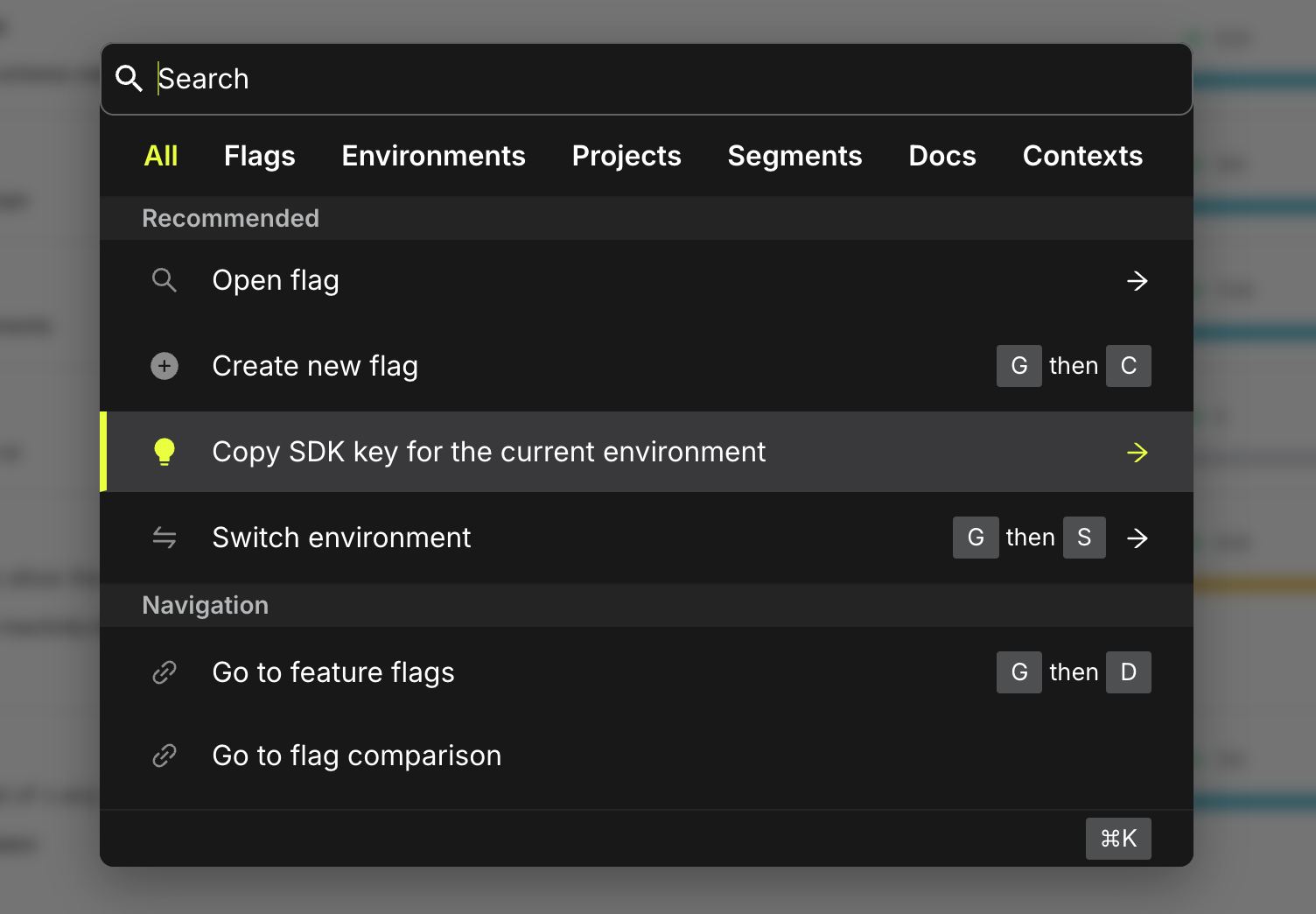
The value you copied should start with sdk-.
Store the SDK key you copied as an environment variable named
LAUNCHDARKLY_SDK_KEY in your Convex deployment. You can do so on the
environment variables
page or via npx convex env set LAUNCHDARKLY_SDK_KEY sdk-*** from the CLI.
You can now configure the LaunchDarkly integration. On the Integrations page of the LaunchDarkly dashboard, search for Convex and click "Add Integration".
Each of your Convex deployments (e.g. Production and other developer's environments) will need their own integration configured in LaunchDarkly.
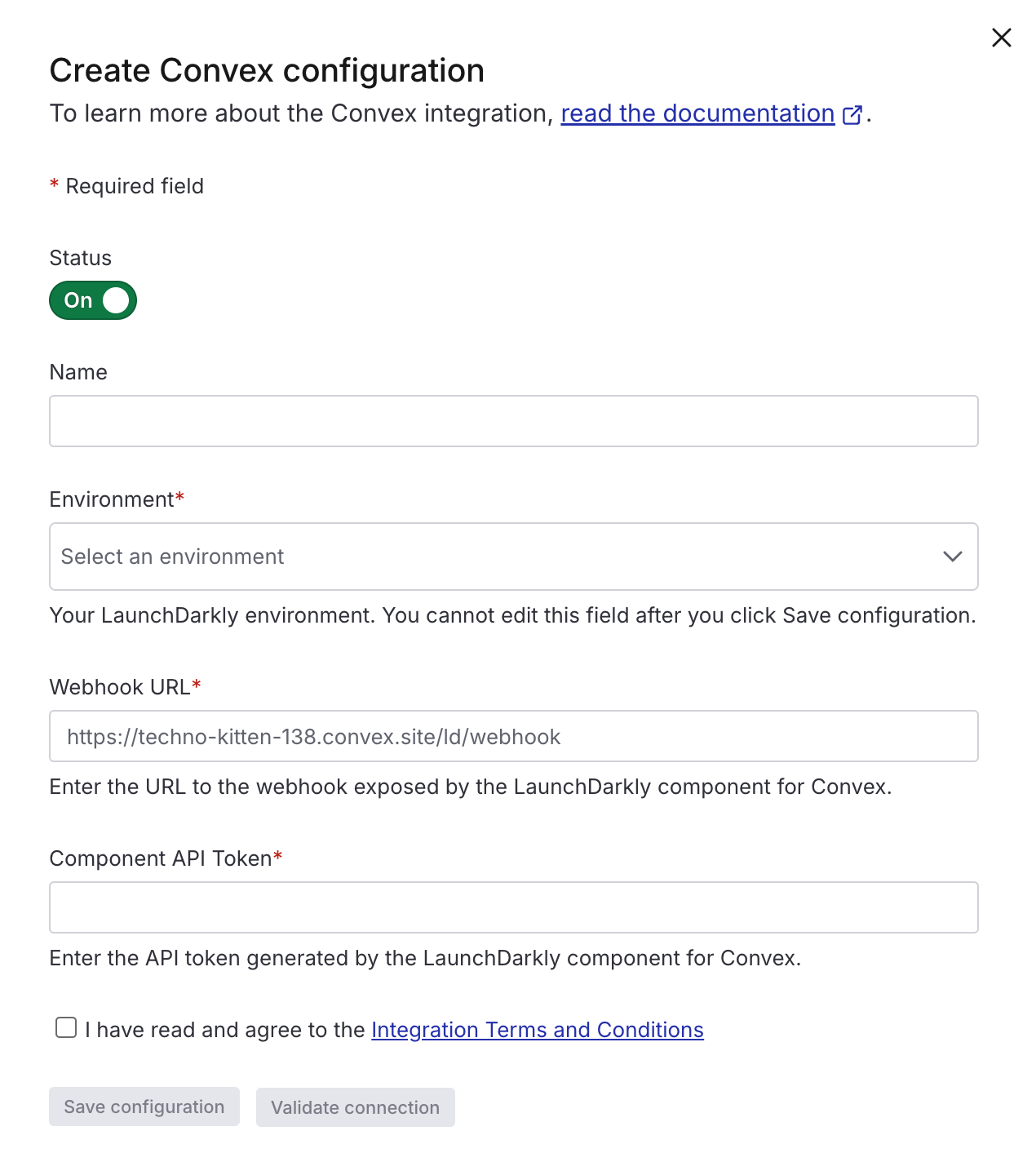
Select a name and environment for the integration.
For "Webhook URL", use your deployment's HTTP Actions URL suffixed with the path
provided to the registerRoutes call in your http.ts file. By default, the
path is /ld/webhook. You can retrieve your HTTP Actions URL on the
Deployment Settings page of
the Convex dashboard. Example:
https://techno-kitten-138.convex.site/ld/webhook
For "Component API Token", generate a shared secret to be used by the LaunchDarkly integration. This will ensure the payloads sent to your webhook are coming from LaunchDarkly.
npx convex run --component=launchdarkly tokens:generate --push
Once you save, you can open the integration form again and click the Validate button to test the connection. If you encounter errors, check the logs page in the Convex dashboard for more information.
Using the LaunchDarkly component
You may initialize the LaunchDarkly class with the component configuration and use the LaunchDarkly SDK as you would in a normal JavaScript application.
import { LaunchDarkly } from "@convex-dev/launchdarkly";
import { components } from "./_generated/api";
import { query } from "./_generated/server";
const launchdarkly = new LaunchDarkly(components.launchdarkly);
export const myQuery = query({
args: {},
handler: async ({ ctx }) => {
const ld = launchdarkly.sdk(ctx);
const isFlagOn = await ld.boolVariation(
"my-flag",
{ key: "myUser" },
false,
);
if (isFlagOn) {
// Do something when flag is on
} else {
// Do something when flag is off
}
},
});
Example App
You can run the example in the examples folder to see
how the LaunchDarkly component works.
Production
When you're ready to deploy your app to production with LaunchDarkly, be sure to
follow all the setup steps for production, including adding the
LAUNCHDARKLY_SDK_KEY evnironment variable and configuring an additional shared
secret and integration for Production. You'll want this to be configured before
any of your code relies on the LaunchDarkly flags.
You may use this command to generate your production secret:
npx convex run --component=launchdarkly --prod tokens:generate
Syncing multiple LaunchDarkly environments in one Convex app
If you have multiple LaunchDarkly environments, you can create a separate component configuration for each environment.
// convex/convex.config.js
import { defineApp } from "convex/server";
import launchdarkly from "@convex-dev/launchdarkly/convex.config.js";
const app = defineApp();
app.use(launchdarkly, {
name: "first",
});
app.use(launchdarkly, {
name: "second",
});
export default app;
Be sure to also update your http.ts file to register the routes for each
component:
// convex/http.ts
import { httpRouter } from "convex/server";
import { registerRoutes } from "@convex-dev/launchdarkly";
import { components } from "./_generated/api";
const http = httpRouter();
registerRoutes(components.first, http, "/ld/first");
registerRoutes(components.second, http, "/ld/second");
export default http;
Then you can generate a separate shared secret for each environment:
npx convex run --component=first tokens:generate
npx convex run --component=second tokens:generate
Also, store the appropriate SDK keys in your Convex deployment for each LaunchDarkly environment:
These secrets can be plugged into seperate integration configurations in LaunchDarkly.
Once configured, you may initialize LaunchDarkly with the appropriate
component configuration:
import { LaunchDarkly } from "@convex-dev/launchdarkly";
const launchDarklyFirst = new LaunchDarkly(components.first, {
LAUNCHDARKLY_SDK_KEY: process.env.LAUNCHDARKLY_SDK_KEY_FIRST!,
});
const launchDarklySecond = new LaunchDarkly(components.second, {
LAUNCHDARKLY_SDK_KEY: process.env.LAUNCHDARKLY_SDK_KEY_SECOND!,
});
export const myQuery = query({
args: {},
handler: async ({ ctx }) => {
const ldFirst = launchdarklyFirst.sdk(ctx);
const ldSecond = launchDarklySecond.sdk(ctx);
...
},
});
Unsupported LaunchDarkly features
The LaunchDarkly component for Convex is in beta, and may not support all functionality available in the LaunchDarkly SDK. If you encounter any issues or need help with a specific feature, please file an issue in the GitHub repository.
- Sending events in Convex queries is not supported. If you would like to have the SDK send events to LaunchDarkly (e.g. flag evaluation insights and for experimentation), you should use LaunchDarkly in a mutation or action instead.
- Big segments
- Diagnostic events