WorkOS AuthKit
WorkOS identity synchronization
git clone https://github.com/bijectionhq/workos-authkit.git
cd workos-authkit
git checkout c335349add05ce52547259d0c02fceb3c3d0b835
Bijection repository access is required. Request access.
Description
WorkOS identity synchronization
Explore the package README for API concepts, configuration, and examples. Check the Bijection source for adaptation-specific setup.
Review the source and its dependencies before adopting this package. Source availability does not establish npm publication or runtime qualification.
Getting started
- Get the source at the revision above and read its package documentation.
- Check the required Bijection SDK version, dependencies, and external service credentials.
- Follow the package setup instructions and the guide to using components.
- Exercise the component in your deployment according to your project’s verification rules.
Open source
Maintained source: bijectionhq/workos-authkit. Based on convex/workos-authkit. License: Apache-2.0. Consult the repository for license terms, notices, and contributor attribution.
From the upstream publisher
A WorkOS AuthKit component for Convex.
Explore the demo ↗Demo video
Upstream overview
From the upstream package documentation.
The WorkOS AuthKit component provides official integration between WorkOS AuthKit authentication and Convex databases. It automatically syncs user data from WorkOS to Convex via webhooks, handles WorkOS events like user creation and deletion with custom Convex functions, and supports WorkOS actions to control user registration and authentication flows. The component manages the complete lifecycle of auth data synchronization and event handling in a reliable, durable way.
Use cases
From the upstream package documentation.
- Sync user profiles automatically when you need WorkOS user data (email, firstName, lastName) to stay in sync with your Convex database without manual API calls
- Handle user lifecycle events to create related data like todo lists, user preferences, or team memberships when users are created, updated, or deleted in WorkOS
- Control user registration flows by implementing WorkOS actions that validate email domains, check invitation codes, or enforce custom business rules before allowing signup
- Extend auth data with app-specific fields by maintaining your own users table that references the synced WorkOS data and adds custom properties
- Process additional WorkOS events like session creation or team updates by configuring webhook handlers for any WorkOS event type
How it works
From the upstream package documentation.
The component installs as a standard Convex component using app.use() in your convex.config.ts file. You create an AuthKit client instance that connects to the component and register its HTTP routes to handle incoming webhooks from WorkOS.
Webhook events from WorkOS automatically trigger the component's internal functions to sync user data. You can extend this by defining event handlers using the authKit.events() method, which lets you respond to user.created, user.updated, user.deleted, and any additional WorkOS event types. Each handler receives a mutation context and typed event data.
For WorkOS actions, you use the authKit.actions() method to define handlers that can allow or deny authentication and registration attempts. The component provides response objects with allow() and deny() methods to control the outcome. All webhook signatures and action secrets are verified automatically using environment variables.
Upstream package FAQ
How does WorkOS AuthKit component handle user data synchronization?
The @convex-dev/workos-authkit component uses WorkOS webhooks to automatically sync user data to your Convex database. When users sign up, update profiles, or change organizations in WorkOS, the component receives webhook events and updates the corresponding records in Convex through built-in actions.
What WorkOS AuthKit events are supported by this component?
The component handles standard WorkOS AuthKit events including user creation, profile updates, organization membership changes, and user deletions. Each event type triggers corresponding Convex actions that maintain data consistency between WorkOS and your Convex database.
Can I customize how WorkOS user data is stored in Convex?
Yes, the @convex-dev/workos-authkit component allows you to customize the database schema and data transformation logic. You can modify which user attributes are stored, add custom fields, and define how organization data maps to your Convex tables while maintaining the automatic synchronization.
Does this component require specific Convex schema setup?
The @convex-dev/workos-authkit component includes recommended schema definitions for storing WorkOS user and organization data in Convex. You can use the provided schemas or adapt them to fit your existing database structure while ensuring compatibility with the synchronization actions.
Use with agents and CLI
Give your coding agent the component’s source identity and setup guidance.
Help me integrate WorkOS AuthKit with Bijection.

Read: https://bijection.com/components/workos-authkit/SKILL.md

Check SDK compatibility and dependency availability.
Follow this project's execution and verification rules.Upstream README.md
View repository ↗Documentation from convex/workos-authkit, recorded October 23, 2026. APIs and setup may differ in the Bijection adaptation.
This component is the official way to integrate WorkOS AuthKit authentication with your Convex project.
Features:
- Sync user data from WorkOS to your Convex database reliably and durably.
- Respond to events with Convex functions.
- Backfill existing WorkOS users when adding the component to an existing app.
See example for a demo of how to incorporate this component into your application.
Open a GitHub issue with any feedback or bugs you find.
Prerequisites
Follow the Convex WorkOS AuthKit guide to set up a working project with WorkOS AuthKit.
Then follow the steps below to set up user data syncing and event handling.
Configure webhooks
User data syncing requires webhooks to be configured in your WorkOS project.
Select Webhooks from the left sidebar in your WorkOS project, and create a new webhook with the following settings:
- Endpoint URL:
https://<your-convex-deployment>.convex.site/workos/webhook - Events:
user.created,user.updated,user.deleted
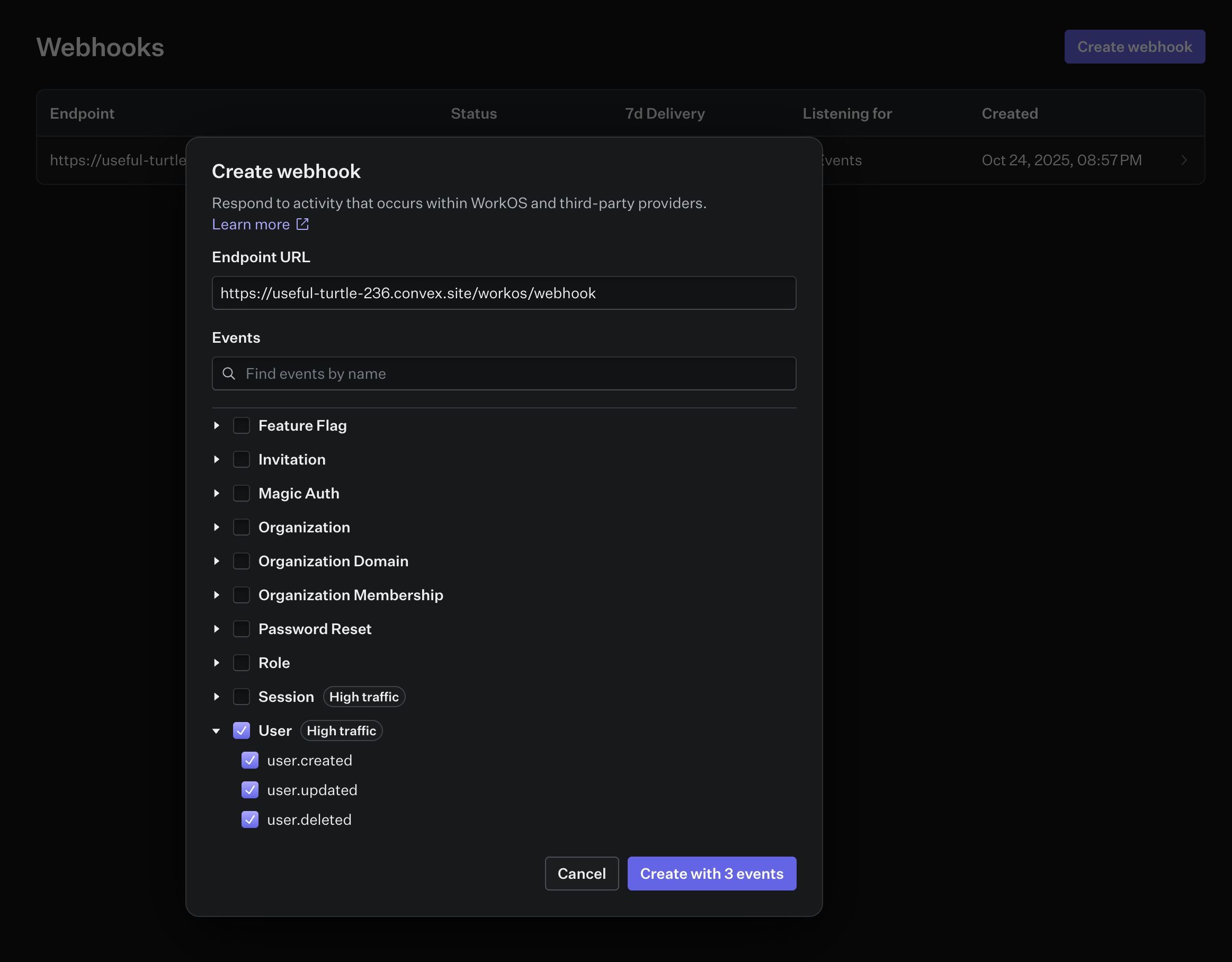
Copy the webhook secret and add it to your environment variables as
WORKOS_WEBHOOK_SECRET.
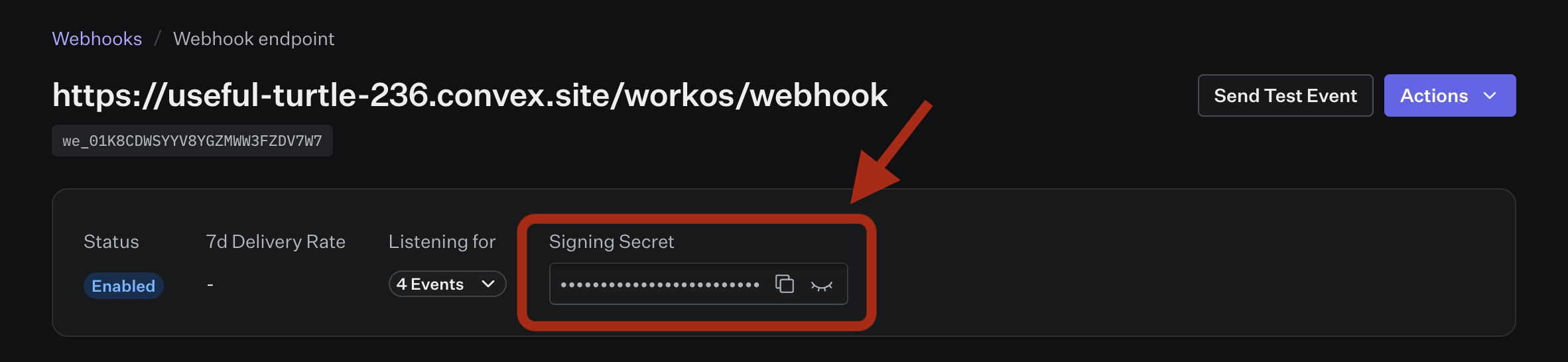
npx convex env set WORKOS_WEBHOOK_SECRET=<your-webhook-secret>
Installation
First, add @convex-dev/workos-authkit to your Convex project:
npm install @convex-dev/workos-authkit
Then, install the component within your convex/convex.config.ts file:
// convex/convex.config.ts
import workOSAuthKit from "@convex-dev/workos-authkit/convex.config";
import { defineApp } from "convex/server";
const app = defineApp();
app.use(workOSAuthKit);
export default app;
Create a Convex AuthKit client within your convex/ folder, and point it
to the installed component:
// convex/auth.ts
import { AuthKit } from "@convex-dev/workos-authkit";
import { components } from "./_generated/api";
import type { DataModel } from "./_generated/dataModel";
export const authKit = new AuthKit<DataModel>(components.workOSAuthKit);
Finally, register component webhook routes in convex/http.ts:
import { httpRouter } from "convex/server";
import { authKit } from "./auth";
const http = httpRouter();
authKit.registerRoutes(http);
export default http;
Custom domain
If you've configured a custom WorkOS authentication API domain, pass it as apiHostname when constructing the AuthKit client. This routes the WorkOS SDK through your domain and updates the JWT issuer and JWKS URLs to match.
// convex/auth.ts
export const authKit = new AuthKit<DataModel>(components.workOSAuthKit, {
apiHostname: "auth.example.com",
});
Usage
User create/update/delete in WorkOS will be automatically synced by the component.
Use the getAuthUser component method to get the current authenticated user
object:
export const getCurrentUser = query({
args: {},
handler: async (ctx, _args) => {
const user = await authKit.getAuthUser(ctx);
return user;
},
});
Events
The AuthKit component can be configured to handle events from WorkOS. This is useful for running code when a user is created, updated, or deleted in WorkOS, or in response to any other provided event.
By default the component will handle the following events:
user.createduser.updateduser.deleted
// convex/auth.ts
import { AuthKit, type AuthFunctions } from "@convex-dev/workos-authkit";
import { components, internal } from "./_generated/api";
import type { DataModel } from "./_generated/dataModel";
// Get a typed object of internal Convex functions exported by this file
const authFunctions: AuthFunctions = internal.auth;
const authKit = new AuthKit<DataModel>(components.workOSAuthKit, {
authFunctions,
});
// create `authKitEvent` as a named export
export const { authKitEvent } = authKit.events({
"user.created": async (ctx, event) => {
// ctx is a mutation context and event.data is typed
await ctx.db.insert("todoLists", {
name: `${event.data.firstName}'s Todo List`,
userId: event.data.id,
});
},
});
Additional event types
The component can handle any WorkOS event type. WorkOS docs provide a complete list of events. To handle an additional event type, select it in your webhook configuration and add a handler for it.
// convex/auth.ts
import { AuthKit, type AuthFunctions } from "@convex-dev/workos-authkit";
import { components, internal } from "./_generated/api";
import type { DataModel } from "./_generated/dataModel";
const authFunctions: AuthFunctions = internal.auth;
const authKit = new AuthKit<DataModel>(components.workOSAuthKit, {
authFunctions,
});
export const { authKitEvent } = authKit.events({
"session.created": async (ctx, event) => {
// do something with the session data
},
"session.revoked": async (ctx, event) => {
// do something with the session data
},
});
User data
Most apps will need to control their user schema and be able to query directly against a users table. The AuthKit component has it's own user table with user data from WorkOS. You can think of this as auth metadata for your users, but you'll likely want to extend this with additional data from your app.
A common pattern for this is to create your own users table with a reference to the AuthKit user table, using the user events to do any necessary syncing.
// convex/auth.ts
import { AuthKit, type AuthFunctions } from "@convex-dev/workos-authkit";
import { components, internal } from "./_generated/api";
import type { DataModel } from "./_generated/dataModel";
const authFunctions: AuthFunctions = internal.auth;
const authKit = new AuthKit<DataModel>(components.workOSAuthKit, {
authFunctions,
});
export const { authKitEvent } = authKit.events({
"user.created": async (ctx, event) => {
await ctx.db.insert("users", {
authId: event.data.id,
email: event.data.email,
name: `${event.data.firstName} ${event.data.lastName}`,
});
},
"user.updated": async (ctx, event) => {
const user = await ctx.db
.query("users")
.withIndex("authId", (q) => q.eq("authId", event.data.id))
.unique();
if (!user) {
console.warn(`User not found: ${event.data.id}`);
return;
}
await ctx.db.patch(user._id, {
email: event.data.email,
name: `${event.data.firstName} ${event.data.lastName}`,
});
},
"user.deleted": async (ctx, event) => {
const user = await ctx.db
.query("users")
.withIndex("authId", (q) => q.eq("authId", event.data.id))
.unique();
if (!user) {
console.warn(`User not found: ${event.data.id}`);
return;
}
await ctx.db.delete(user._id);
},
// Handle any event type
"session.created": async (ctx, event) => {
console.log("onCreateSession", event);
},
});
Backfilling existing users
If you're adding this component to an app that already has users in WorkOS, you
can backfill them into the component's user table. The backfill also fires
user.created event handlers, so your app's own tables get populated too.
Export the backfill utility from your auth file:
// convex/auth.ts
export const { backfillUsers } = authKit.utils();
Then trigger it from the CLI or the Convex dashboard:
npx convex run auth:backfillUsers
The backfill processes users oldest-first. It's idempotent - if interrupted, just run it again and it will skip users that are already synced.
Actions
The AuthKit component can be configured to handle actions from WorkOS. Actions allow you to block user registration or authentication based on your own logic. Read more about actions in the WorkOS docs.
Configuration
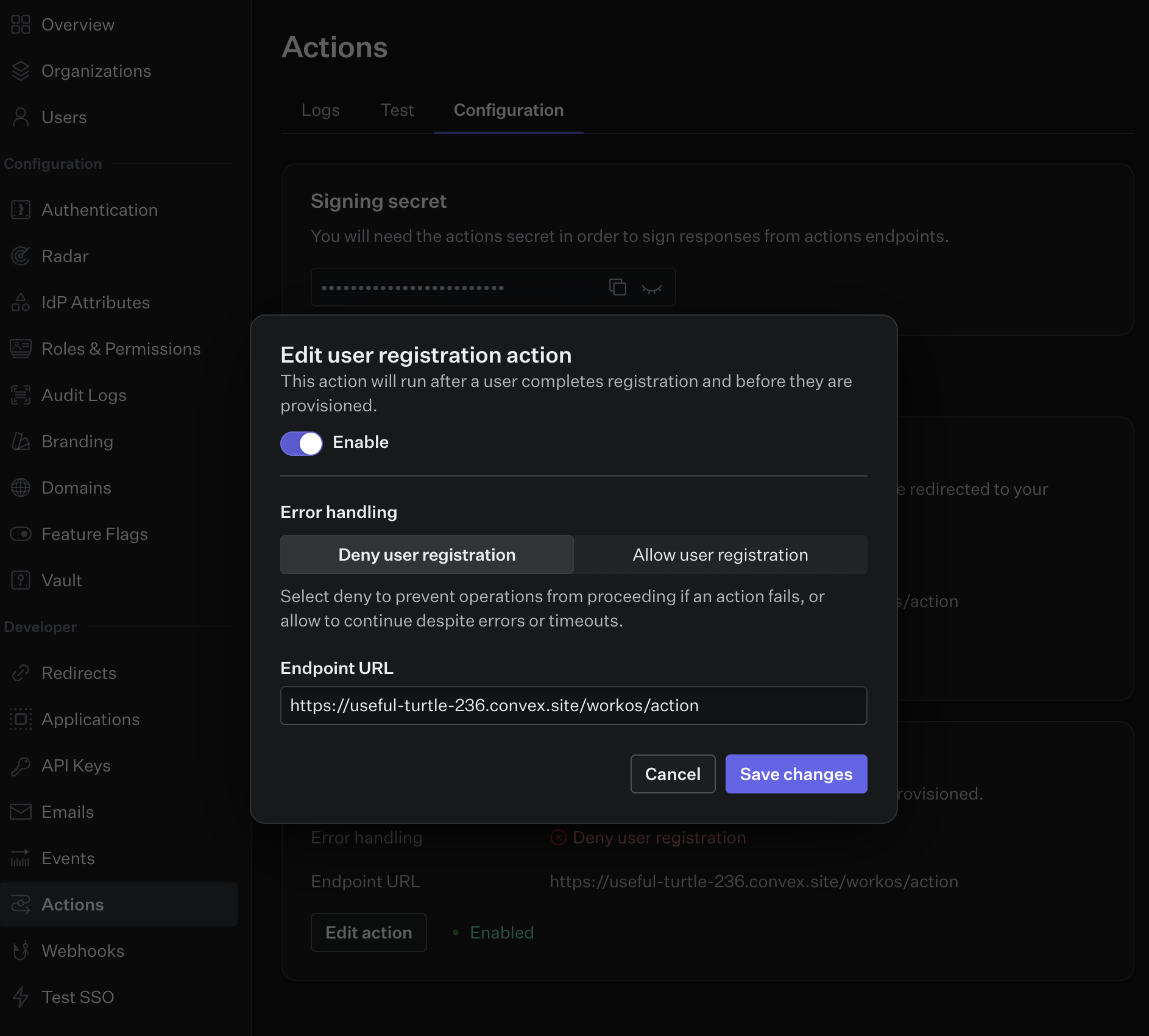
- Configure actions in your WorkOS dashboard.
- Set the endpoint URL for your action(s) to
https://<your-convex-deployment>.convex.site/workos/action - Copy the action signing secret from the dashboard and set it in your
environment variables as
WORKOS_ACTION_SECRET.
Usage
Action handlers are defined using the actions method on the AuthKit component.
AuthKit actions must return a response payload that allows or denies the action,
so a response object is provided to the action handler with allow and deny
methods.
// convex/auth.ts
import { AuthKit, type AuthFunctions } from "@convex-dev/workos-authkit";
import { components, internal } from "./_generated/api";
import type { DataModel } from "./_generated/dataModel";
const authFunctions: AuthFunctions = internal.auth;
const authKit = new AuthKit<DataModel>(components.workOSAuthKit, {
authFunctions,
});
export const { authKitAction } = authKit.actions({
authentication: async (_ctx, _action, response) => {
return response.allow();
},
userRegistration: async (_ctx, action, response) => {
if (action.userData.email.endsWith("@gmail.com")) {
return response.deny("Gmail accounts are not allowed");
}
return response.allow();
},
});