Persistent Text Streaming
Persisted text streaming
git clone https://github.com/bijectionhq/persistent-text-streaming.git
cd persistent-text-streaming
git checkout 17887b3dd8a19ed5db576acf592cca0adcef2d03
Bijection repository access is required. Request access.
Description
Persisted text streaming
Explore the package README for API concepts, configuration, and examples. Check the Bijection source for adaptation-specific setup.
Review the source and its dependencies before adopting this package. Source availability does not establish npm publication or runtime qualification.
Getting started
- Get the source at the revision above and read its package documentation.
- Check the required Bijection SDK version, dependencies, and external service credentials.
- Follow the package setup instructions and the guide to using components.
- Exercise the component in your deployment according to your project’s verification rules.
Open source
Maintained source: bijectionhq/persistent-text-streaming. Based on convex/persistent-text-streaming. License: Apache-2.0. Consult the repository for license terms, notices, and contributor attribution.
From the upstream publisher
A Convex component for streaming durable text to the client, from LLMs and other sources.
Upstream overview
From the upstream package documentation.
This component combines HTTP streaming with database persistence to deliver real-time text updates while storing content permanently. It provides a React hook that streams text from HTTP actions while simultaneously persisting chunks to the database at sentence boundaries. Developers get low-latency streaming for the original client plus durable storage accessible by other users or after reconnection.
Use cases
From the upstream package documentation.
- Building AI chat applications where you want users to see tokens streaming in real-time but also need conversations persisted for chat history and sharing
- Creating collaborative writing tools where one user generates content that streams live to collaborators while being saved incrementally to the database
- Implementing live transcription features where audio is converted to text in real-time, streamed to the UI, and stored for later retrieval and searching
- Building code generation interfaces where AI-generated code streams to the developer while being saved to project files or revision history
- Creating real-time document summarization where large documents are processed and summaries stream to users while being persisted for team access
How it works
From the upstream package documentation.
The component exposes a PersistentTextStreaming class that manages stream lifecycle through createStream() and getStreamBody() methods. Developers create streams in mutations, then use HTTP actions with the stream() method to generate and append text chunks via a provided chunkAppender callback function.
On the frontend, the provided React hook useStream() connects to both the HTTP streaming endpoint and a Convex query simultaneously. The hook displays real-time tokens from the HTTP stream while the database receives updates at sentence boundaries, balancing performance with persistence.
Integration requires installing the component via app.use() in convex.config.ts, creating HTTP routes for streaming endpoints, and using the React hook with your streaming URL and query function. The component handles CORS headers and manages the connection between ephemeral HTTP streams and durable database storage.
Upstream package FAQ
Does this work with any AI streaming API?
Persistent Text Streaming works with any text streaming source that provides chunks sequentially, including OpenAI, Anthropic, and other AI APIs. The component handles the streaming protocol while you provide the text generation logic through Convex actions or mutations.
How does it handle database write performance during streaming?
The component batches text chunks and uses optimized Convex mutations to minimize database writes while maintaining real-time streaming performance. It queues chunks in memory and persists them efficiently without blocking the streaming UI updates.
Can users see partial responses if the stream is interrupted?
Yes, Persistent Text Streaming saves chunks to your Convex database as they arrive, so users always see the content generated before any interruption. When reconnecting, they'll see the previously streamed content and continue from where the stream stopped.
Does this component handle multiple concurrent streams?
Persistent Text Streaming supports multiple concurrent streams by using unique stream identifiers stored in your Convex database. Each stream maintains its own state, progress tracking, and persistence queue without interfering with other active streams.
Use with agents and CLI
Give your coding agent the component’s source identity and setup guidance.
Help me integrate Persistent Text Streaming with Bijection.

Read: https://bijection.com/components/persistent-text-streaming/SKILL.md

Check SDK compatibility and dependency availability.
Follow this project's execution and verification rules.Upstream README.md
View repository ↗Documentation from convex/persistent-text-streaming, recorded October 23, 2026. APIs and setup may differ in the Bijection adaptation.
This Convex component enables persistent text streaming. It provides a React hook for streaming text from HTTP actions while simultaneously storing the data in the database. This persistence allows the text to be accessed after the stream ends or by other users.
The most common use case is for AI chat applications. The example app (found in
the example directory) is a just such a simple chat app that demonstrates use
of the component.
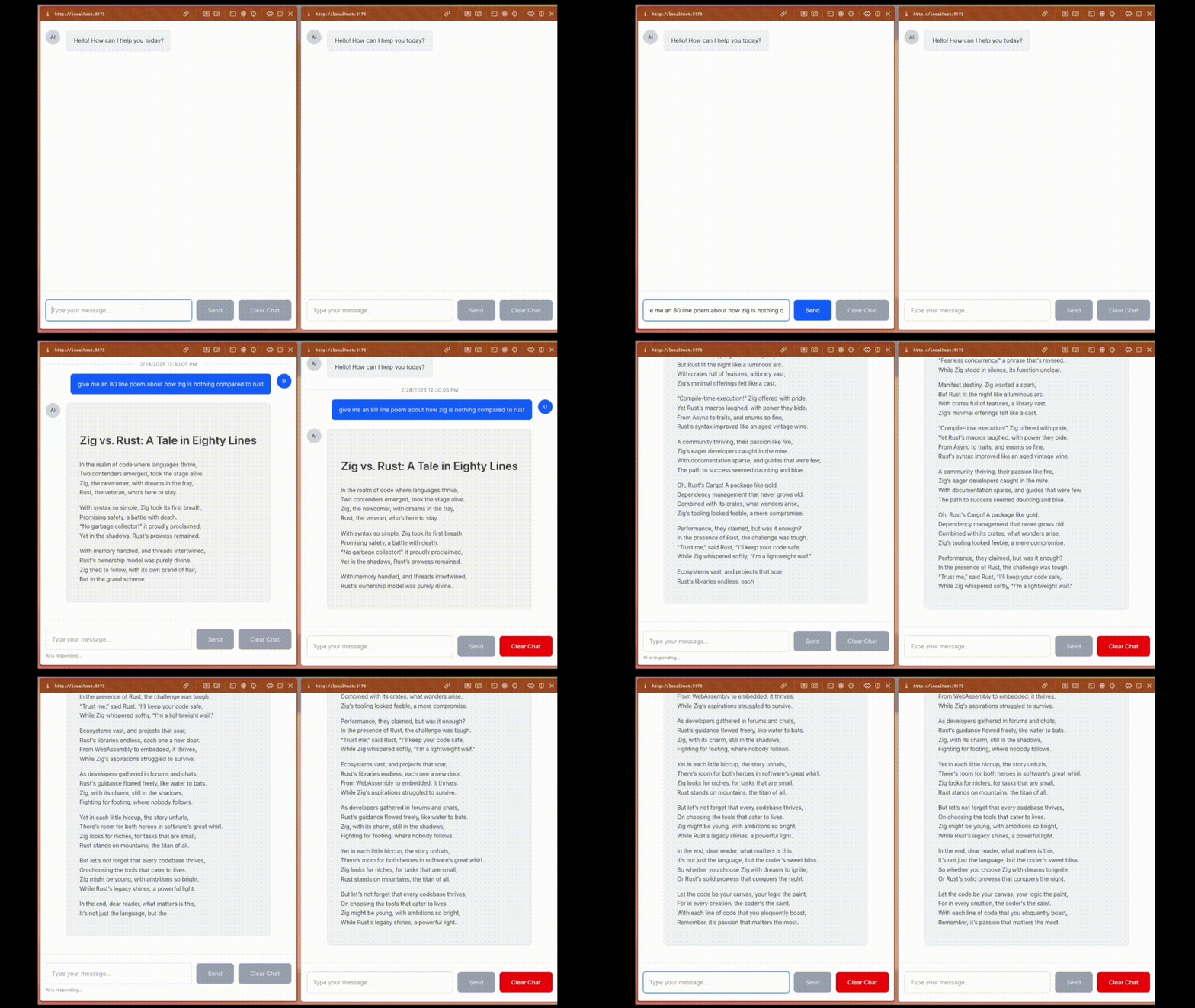
Here's what you'll end up with! The left browser window is streaming the chat body to the client, and the right browser window is subscribed to the chat body via a database query. The message is only updated in the database on sentence boundaries, whereas the HTTP stream sends tokens as they come:
Pre-requisite: Convex
You'll need an existing Convex project to use the component. Convex is a hosted backend platform, including a database, serverless functions, and a ton more you can learn about here.
Run npm create convex or follow any of the
quickstarts to set one up.
Installation
See example/ for a working demo.
- Install the Persistent Text Streaming component:
npm install @convex-dev/persistent-text-streaming
- Create a
convex.config.tsfile in your app'sconvex/folder and install the component by callinguse:
// convex/convex.config.ts
import { defineApp } from "convex/server";
import persistentTextStreaming from "@convex-dev/persistent-text-streaming/convex.config.js";
const app = defineApp();
app.use(persistentTextStreaming);
export default app;
Usage
Here's a simple example of how to use the component:
In convex/chat.ts:
const persistentTextStreaming = new PersistentTextStreaming(
components.persistentTextStreaming,
);
// Create a stream using the component and store the id in the database with
// our chat message.
export const createChat = mutation({
args: {
prompt: v.string(),
},
handler: async (ctx, args) => {
const streamId = await persistentTextStreaming.createStream(ctx);
const chatId = await ctx.db.insert("chats", {
title: "...",
prompt: args.prompt,
stream: streamId,
});
return chatId;
},
});
// Create a query that returns the chat body.
export const getChatBody = query({
args: {
streamId: StreamIdValidator,
},
handler: async (ctx, args) => {
return await persistentTextStreaming.getStreamBody(
ctx,
args.streamId as StreamId,
);
},
});
// Create an HTTP action that generates chunks of the chat body
// and uses the component to stream them to the client and save them to the database.
export const streamChat = httpAction(async (ctx, request) => {
const body = (await request.json()) as { streamId: string };
const generateChat = async (ctx, request, streamId, chunkAppender) => {
await chunkAppender("Hi there!");
await chunkAppender("How are you?");
await chunkAppender("Pretend I'm an AI or something!");
};
const response = await persistentTextStreaming.stream(
ctx,
request,
body.streamId as StreamId,
generateChat,
);
// Set CORS headers appropriately.
response.headers.set("Access-Control-Allow-Origin", "*");
response.headers.set("Vary", "Origin");
return response;
});
You need to expose this HTTP endpoint in your backend, so in convex/http.ts:
http.route({
path: "/chat-stream",
method: "POST",
handler: streamChat,
});
// Handle CORS preflight requests so browsers will allow the POST above when
// your app is served from a different origin than your Convex deployment.
http.route({
path: "/chat-stream",
method: "OPTIONS",
handler: httpAction(async (_, request) => {
const headers = request.headers;
if (
headers.get("Origin") !== null &&
headers.get("Access-Control-Request-Method") !== null &&
headers.get("Access-Control-Request-Headers") !== null
) {
return new Response(null, {
headers: new Headers({
"Access-Control-Allow-Origin": "*",
"Access-Control-Allow-Methods": "POST",
"Access-Control-Allow-Headers": "Content-Type, Digest, Authorization",
"Access-Control-Max-Age": "86400",
}),
});
} else {
return new Response();
}
}),
});
Finally, in your app, you can now create chats and them subscribe to them via stream and/or database query as optimal:
// chat-input.tsx, maybe?
const createChat = useMutation(api.chat.createChat);
const formSubmit = async (e: React.FormEvent) => {
e.preventDefault();
const chatId = await createChat({
prompt: inputValue,
});
};
// chat-message.tsx, maybe?
import { useStream } from "@convex-dev/persistent-text-streaming/react";
// ...
// In our component:
const { text, status } = useStream(
api.chat.getChatBody, // The query to call for the full stream body
new URL(`${convexSiteUrl}/chat-stream`), // The HTTP endpoint for streaming
driven, // True if this browser session created this chat and should generate the stream
chat.streamId as StreamId, // The streamId from the chat database record
);
Svelte (beta)
Svelte 5 bindings are community-supported and in beta. They need svelte and
convex-svelte, with
setupConvex called in a parent component. Reactive inputs are passed as
getters. See example-svelte/ for the chat app.
<script lang="ts">
import { useStream } from "@convex-dev/persistent-text-streaming/svelte";
let { chat, driven }: { chat: Doc<"chats">; driven: boolean } = $props();
const stream = useStream(
api.chat.getChatBody,
new URL(`${convexSiteUrl}/chat-stream`),
() => driven,
() => chat.streamId as StreamId,
// Optional, read when a stream starts:
// () => ({ authToken, headers }),
);
</script>
<p>{stream.text}</p>
stream.text and stream.status update as the stream progresses. The HTTP
request only starts in the browser, never during server-side rendering.
Design Philosophy
This component balances HTTP streaming with database persistence to try to maximize the benefits of both. To understand why this balance is beneficial, let's examine each approach in isolation.
-
HTTP streaming only: If your app only uses HTTP streaming, then the original browser that made the request will have a great, high-performance streaming experience. But if that HTTP connection is lost, if the browser window is reloaded, if other users want to view the same chat, or this users wants to revisit the conversation later, it won't be possible. The conversation is only ephemeral because it was never stored on the server.
-
Database Persistence Only: If your app only uses database persistence, it's true that the conversation will be available for as long as you want. Additionally, Convex's subscriptions will ensure the chat message is updated as new text chunks are generated. However, there are a few downsides: one, the entire chat body needs to be resent every time it is changed, which is a lot redundant bandwidth to push into the database and over the websockets to all connected clients. Two, you'll need to make a difficult tradeoff between interactivity and efficiency. If you write every single small chunk to the database, this will get quite slow and expensive. But if you batch up the chunks into, say, paragraphs, then the user experience will feel laggy.
This component combines the best of both worlds. The original browser that makes the request will still have a great, high-performance streaming experience. But the chat body is also stored in the database, so it can be accessed by the client even after the stream has finished, or by other users, etc.
Background
This component is largely based on the Stack post AI Chat with HTTP Streaming.