Expo Push Notifications
Mobile push delivery
git clone https://github.com/bijectionhq/expo-push-notifications.git
cd expo-push-notifications
git checkout 23226f12ed35cc97a46e748480462660432d4ce7
Bijection repository access is required. Request access.
Description
Mobile push delivery
Explore the package README for API concepts, configuration, and examples. Check the Bijection source for adaptation-specific setup.
Review the source and its dependencies before adopting this package. Source availability does not establish npm publication or runtime qualification.
Getting started
- Get the source at the revision above and read its package documentation.
- Check the required Bijection SDK version, dependencies, and external service credentials.
- Follow the package setup instructions and the guide to using components.
- Exercise the component in your deployment according to your project’s verification rules.
Open source
Maintained source: bijectionhq/expo-push-notifications. Based on convex/expo-push-notifications. License: Apache-2.0. Consult the repository for license terms, notices, and contributor attribution.
From the upstream publisher
A Convex component for managing push notifications with Expo.
Upstream overview
From the upstream package documentation.
This component integrates Convex with Expo's push notification API to send mobile push notifications to app users. It handles batching multiple notifications into efficient API calls, implements exponential backoff retry logic for failed deliveries, and manages user token registration and pause states. The component uses Convex's workpool for parallel processing and provides real-time notification status tracking through queries.
Use cases
From the upstream package documentation.
- Building a chat or messaging app where you need to notify users of new messages when they're not actively using the app
- Creating a social platform that sends push notifications for likes, comments, follows, or other user interactions
- Implementing reminder or scheduling features that need to alert users at specific times or when conditions are met
- Adding notification capabilities to e-commerce apps for order updates, shipping notifications, or promotional messages
- Building team collaboration tools that notify members about project updates, mentions, or deadline reminders
How it works
From the upstream package documentation.
The component starts by registering user push tokens through the recordToken method, which stores Expo push notification tokens in Convex. When sending notifications via sendPushNotification, it looks up the user's token, validates their pause status, and inserts a notification record with "awaiting_delivery" state.
The batching system uses time-bucket markers to group notifications efficiently and schedules batch runs using Convex's scheduling system. A workpool processes multiple batches in parallel with configurable maxParallelism, marking notifications as "in_progress" to prevent duplicate processing.
The component handles partial failures by parsing Expo's batch responses and updating individual notification states accordingly. Temporary failures like MessageRateExceeded are moved to "needs_retry" status with exponential backoff, while successful deliveries are marked as "delivered". You can query notification status in real-time using getNotification and track delivery progress through Convex queries.
Upstream package FAQ
Does this component handle Expo push notification rate limits?
Yes, the Expo Push Notifications component automatically handles rate limiting from Expo's servers. It implements exponential backoff and queues notifications when rate limits are hit, ensuring all notifications are eventually delivered without losing messages.
Can I customize the retry logic for failed notifications?
The Expo Push Notifications component provides configurable retry parameters including maximum retry attempts, backoff intervals, and error handling strategies. You can customize these settings when initializing the component to match your application's requirements.
How does batching work with different notification content?
The component intelligently groups notifications with similar content and delivery parameters into batches of up to 100. Each notification can have unique recipients and custom data while still benefiting from batched delivery to reduce API calls to Expo's servers.
What happens if Expo's push service is temporarily unavailable?
The Expo Push Notifications component queues notifications in your Convex database when Expo's service is unavailable. It automatically retries delivery once the service recovers, ensuring no notifications are lost during outages or maintenance windows.
Use with agents and CLI
Give your coding agent the component’s source identity and setup guidance.
Help me integrate Expo Push Notifications with Bijection.

Read: https://bijection.com/components/expo-push-notifications/SKILL.md

Check SDK compatibility and dependency availability.
Follow this project's execution and verification rules.Upstream README.md
View repository ↗Documentation from convex/expo-push-notifications, recorded October 23, 2026. APIs and setup may differ in the Bijection adaptation.
This is a Convex component that integrates with Expo's push notification API to allow sending mobile push notifications to users of your app. It will batch calls to Expo's API and handle retrying delivery.
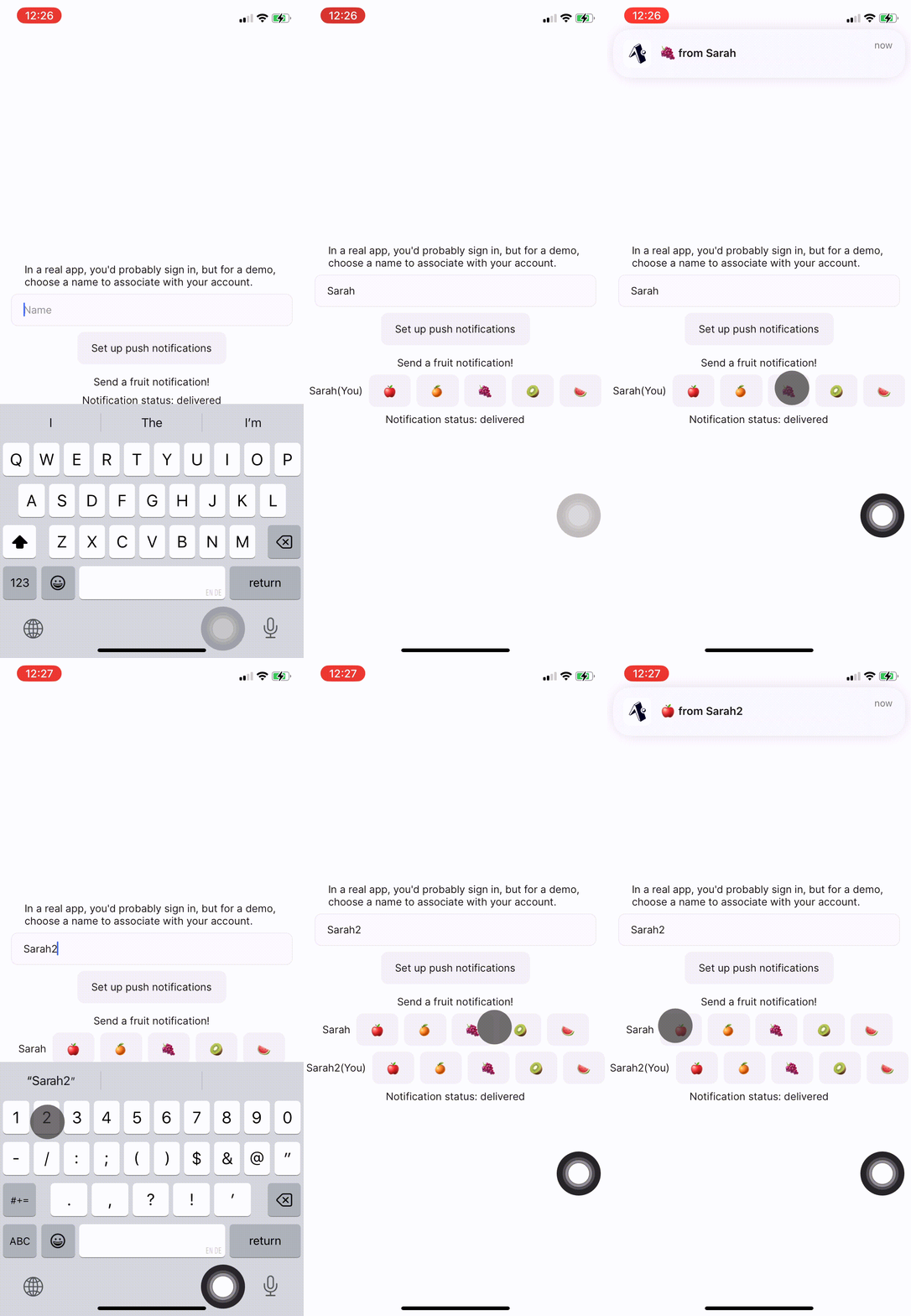
// App.tsx
<Button
onPress={() => {
void convex.mutation(api.example.sendPushNotification, {
to: otherUser,
title: `Hi from ${currentUser.name}`,
});
}}
>
<Text>Say hi!</Text>
</Button>
// convex/example.ts
export const sendPushNotification = mutation({
args: { title: v.string(), to: v.id("users") },
handler: async (ctx, args) => {
// Sending a notification
return pushNotifications.sendPushNotification(ctx, {
userId: args.to,
notification: {
title: args.title,
},
});
},
});
Pre-requisite: Convex
You'll need an existing Convex project to use the component. Convex is a hosted backend platform, including a database, serverless functions, and a ton more you can learn about here.
Run npm create convex or follow any of the
quickstarts to set one up.
Installation
Install the component package:
npm i @convex-dev/expo-push-notifications
Create a convex.config.ts file in your app's convex/ folder and install the
component by calling use:
// convex/convex.config.ts
import { defineApp } from "convex/server";
import pushNotifications from "@convex-dev/expo-push-notifications/convex.config.js";
const app = defineApp();
app.use(pushNotifications, { env: {} });
// other components
export default app;
Instantiate the PushNotifications client in your Convex functions:
// convex/example.ts
import { PushNotifications } from "@convex-dev/expo-push-notifications";
const pushNotifications = new PushNotifications(components.pushNotifications);
It takes in an optional type parameter (defaulting to Id<"users">) for the
type to use as a unique identifier for push notification recipients:
import { PushNotifications } from "@convex-dev/expo-push-notifications";
export type Email = string & { __isEmail: true };
const pushNotifications = new PushNotifications<Email>(
components.pushNotifications,
);
Authenticating with an Expo access token (optional)
If your Expo project has enhanced push security enabled, every request to the Expo push API must include an access token. To opt in, generate a token from your Expo access tokens settings, set it as a Convex environment variable in your deployment:
npx convex env set EXPO_ACCESS_TOKEN <your-token>
and forward it to the component via app.use:
// convex/convex.config.ts
const app = defineApp({
env: {
EXPO_ACCESS_TOKEN: v.optional(v.string()),
},
});
app.use(pushNotifications, {
env: {
EXPO_ACCESS_TOKEN: app.env.EXPO_ACCESS_TOKEN,
}
});
Registering a user for push notifications
Get a user's push notification token following the Expo documentation here, and record it using a Convex mutation:
// convex/example.ts
export const recordPushNotificationToken = mutation({
args: { token: v.string() },
handler: async (ctx, args) => {
const userId = await getAuthUserId(ctx);
await pushNotifications.recordToken(ctx, {
userId,
pushToken: args.token,
});
},
});
You can pause and resume push notification sending for a user using the
pausePushNotifications and resumePushNotifications methods.
To determine if a user has a token and their pause status, you can use
getStatusForUser.
Send notifications
// convex/example.ts
export const sendPushNotification = mutation({
args: { title: v.string(), to: v.string() },
handler: async (ctx, args) => {
const pushId = await pushNotifications.sendPushNotification(ctx, {
userId: args.to,
notification: {
title: args.title,
},
});
},
});
The notification object supports the fields of the
Expo push message format.
You can use the ID returned from sendPushNotifications to query the status of
the notification using getNotification. Using this in a query allows you to
subscribe to the status of a notification.
You can also view all notifications for a user with getNotificationsForUser.
How delivery works
-
How individual notifications are inserted
sendPushNotificationandsendPushNotificationBatchfirst look up the user's Expo token. If the user has no token, the component either throws or returnsnulldepending onallowUnregisteredTokens. If the user's token is paused, the notification is dropped andnullis returned. Otherwise the component inserts a row into thenotificationstable withstate = "awaiting_delivery", a failure count of0, and a short time-bucket marker used for batching. -
How the batcher stays alive while work remains
Every successful insert calls an internal helper that ensures exactly one future batch run is scheduled for the earliest eligible notification segment. If a newly inserted notification becomes eligible sooner than the currently scheduled run, the component cancels the later wake-up and reschedules it earlier. When that batch run wakes up, it either: finds work and enqueues one or more workpool jobs, or finds no work and clears the pending batch-run marker. After each workpool job completes, the component schedules the next batch pass again if there is still work left.
-
How workpool threads parallelize the work
Each batch becomes one workpool job. The workpool limits how many of those jobs may run at once via
maxParallelism, and it keeps its own pending and running bookkeeping internally. Before a batch is handed to the workpool, the notifications in that batch are markedin_progress, which prevents the component from selecting the same notification for another batch at the same time. -
How partial failures are reflected
Expo can accept some notifications in a batch and reject others in the same response. The component records that result per notification: delivered notifications are finalized as
delivered, non-retryable ticket failures are finalized asfailed, and documented temporary ticket failures such asMessageRateExceededare moved toneeds_retry. Failed notifications are not retried inline in the same HTTP request; they are picked up by a later batch pass. Request-level failures are handled separately by the workpool retry policy. -
How temporary failures are deferred
There are two retry layers. If the whole Expo request fails, the workpool retries that batch with exponential backoff. If Expo returns a successful batch response with some individual temporary message failures, those notifications are deferred by moving them back into the queue as
needs_retryand advancing their next eligible segment using exponential backoff. The next batch pass prioritizesneeds_retrynotifications over brand new ones once their scheduled segment becomes eligible, and it sleeps until that exact segment instead of polling. -
How shutdown and paused tokens interact
Paused tokens short-circuit before insertion, so paused users do not create queued notifications.
shutdown()cancels future batch scheduling and cancels pending workpool jobs that have not started yet. Batches already markedin_progressare allowed to drain, andrestart()resumes scheduling once those in-flight notifications have finished.
Troubleshooting
To add more logging, provide PushNotifications with a logLevel in the
constructor:
const pushNotifications = new PushNotifications(components.pushNotifications, {
logLevel: "DEBUG",
});
The push notification sender can be shutdown gracefully, and then restarted
using the shutdown and restart methods.